Attention is divided
Listening, examining, thinking and typing compete for time during a busy consultation.
Developed in Malaysia, MedAssist Clinical helps healthcare professionals turn recorded consultations into structured clinical notes. The clinician checks the transcript, edits the AI draft and approves the final note.
MedAssist Clinical V2 is coming soon to Google Play. See how to get access.

Capturing the conversation is only the beginning. The record still needs to be clear, structured and checked before it can support care.
Listening, examining, thinking and typing compete for time during a busy consultation.
A transcript alone does not give a clinician a usable note. Relevant information needs to be organised and checked.
Medication details, doses, negation and clinical context must be reviewed. AI output needs a clear route to a clinician-approved record.
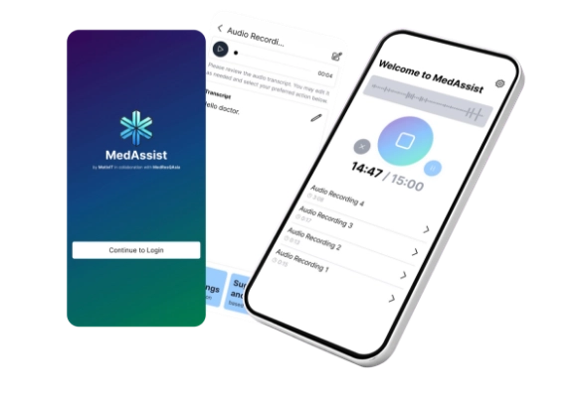
See the workflow in the build we’re preparing for Google Play, from consultation recording to an approved note you can export as a PDF.
Record the consultation after following your organisation’s patient notice and consent process.
Shown from the current build. We’re continuing to validate the workflow ahead of release.
The current build brings recordings, reviewed transcripts and structured notes into one documentation workflow. The clinician approves the draft before it is used as a clinical record.
Android-first development, with recording, playback and encounter organisation central to the product experience.
The internal build includes patient details and encounter history. Filing approved notes in the patient’s Documents tab is still in development.
Generate a draft SOAP note from a confirmed transcript. Additional report formats are still in development.
Correct and confirm the transcript, then edit and approve the draft. Export the approved document as a PDF.
MedAssist uses cloud processing to transcribe recordings and prepare draft notes. Users sign in to access the app. Individual doctors and healthcare teams can contact Medari with questions about how patient data is handled and protected under Malaysia’s PDPA.
Our Malaysia and Philippines team brings experience supporting US clients in software development, managed IT and infrastructure operations. Medari offers custom applications, AI and system integration, workflow automation, managed hosting and technical support.
For institutional use, we’ll confirm connectivity, hosting, integration and support requirements during onboarding.

A GP consultation, a specialist visit and a hospital encounter can call for different notes. Consultations may involve family members, local medical terms and a mix of English, Bahasa Malaysia, Mandarin or other languages.
Multilingual speech recognition and mixed-language consultations are priorities for development and validation. We can discuss testing the languages, accents and medical terms your team uses.
MedAssist is being developed with close guidance from academic researchers in AI and digital health, together with input from healthcare professionals. Their guidance helps shape the workflow, document formats and how the product is tested.
Doctors have used an earlier MedAssist prototype. V2 builds on that work with speaker-labelled transcripts, clinician confirmation, structured notes and PDF export.
We welcome enquiries from doctors who want to use MedAssist in their own practice, as well as clinics, hospitals, universities and other healthcare organisations. We can walk through the workflow and discuss deployment, integration, data governance and ongoing technical support.
Clinical setting, consultation length, languages, document formats and device requirements.
Completeness, clinically important errors and the amount of correction needed before finalisation.
Review patient notice and consent, who can access recordings and notes, where data is stored and processed, and what security and support arrangements apply.
Whether the workflow reduces documentation effort without adding unnecessary steps.
Yes. Doctors in private practice and other clinicians can sign up individually once individual access opens. V2 is coming soon to Google Play. We’ll share sign-up and subscription details when they’re ready.
Contact Medari for team onboarding. Your staff will download the same Android app from Google Play and sign in using the accounts Medari issues for them.
MedAssist is developed by Medari Asia, with close guidance from academic researchers in AI and digital health and input from healthcare professionals. This helps us understand how consultations are documented and what needs to work in practice.
MedAssist focuses on helping doctors prepare clinical notes. You can continue using your current system for appointments, billing and medicine dispensing. We can discuss how MedAssist would fit into your clinic’s way of working.
No. MedAssist helps prepare documentation. The doctor reviews and approves each AI draft before it is used as a clinical record and remains responsible for diagnosis, treatment and prescriptions.
Tell us if your team works in places with unreliable internet. We’ll confirm the connectivity requirements and available recording options for the build you evaluate.
When you submit a recording, MedAssist sends the audio to cloud services to create a transcript. You check and confirm that transcript before it’s used to draft a clinical note. You can edit and approve the note before exporting it.
Storage and AI processing can happen in different locations. Some AI processing may take place outside Malaysia. Individual clinicians and organisations can contact Medari to ask where audio, transcripts and notes are handled, and what safeguards apply to transfers outside Malaysia.
MedAssist is designed to help doctors prepare clinical notes. Whether you sign up personally or through a clinic, make sure your practice permits recording and cloud processing of patient information. Explain both to the patient, obtain and document their informed consent before recording, and continue the consultation without recording if they decline.
Keep the recording and notes confidential, follow Malaysia’s Personal Data Protection Act (PDPA) where applicable, and check the safeguards for any processing outside Malaysia. Review and approve the draft before it goes into the patient’s record. See the Malaysian Medical Council’s recording guidance.
Explain that you plan to record the consultation and use a cloud-based AI tool to help prepare the clinical note. Follow your practice’s patient notice and consent process. If the patient declines, continue the consultation and document it without recording.
MedAssist requires users to sign in. For team deployments, Medari issues accounts to the users agreed with the organisation. Health information is sensitive personal data under Malaysia’s Personal Data Protection Act (PDPA).
If you’re signing up personally or reviewing MedAssist for a team, you can ask us about who can access patient data, protection during transfer and storage, how long recordings and notes are kept, deletion, AI provider data use or security incidents. Email privacy@medariasia.com. Please leave patient details and clinical documents out of your email.
HIPAA is a US health privacy and security law. Any use that requires HIPAA compliance needs a review of the specific deployment, its safeguards and any required business associate agreements. If your organisation has HIPAA requirements, contact privacy@medariasia.com before using the service with patient data.
Share a blank template or sample with no patient information. We will check what the app already supports and whether any changes are needed.
Email sales@medariasia.com. Tell us about your clinic, how many people may use it and what you need help with. We’ll arrange a discussion and explain the evaluation options.
Individual clinicians and healthcare organisations can contact Medari to arrange a demo or ask about access. Tell us how your team documents consultations, how many users need access and what your IT or data governance team needs to review.
sales@medariasia.com · Please do not send patient information.
For custom healthcare software and managed services, visit Medari Asia.